 MenuGleam
A guided photo workflow
AI Food Photo Editor for Restaurant Photos
Change the presentation of a dish photo with an AI-guided workflow: upload, choose a look, enhance and review.
Enhancements use credits. Sign in and choose or create a restaurant to get started.
Edit presentation with a guided workflow
MenuGleam uses your photo and chosen restaurant look to guide lighting and scene changes. You review the generated image before deciding whether to use it.
The current product does not offer exposure sliders, brushes, layers, manual selections or free-form text editing. Choose this workflow when you want to explore a different presentation of your food, with a human review of the result.
From upload to a reviewed result
Choose your restaurant
Sign in, then open an existing restaurant or create one for the photos you want to work on.
Upload a dish photo
Add a clear photo of the food you actually serve. Keep the dish and its container visible so you have a useful reference for review.
Choose a look and enhance
Select an available restaurant look to guide the lighting and setting. Submit the photo using credits and follow its progress in your enhancement history.
Compare and download
Compare the result with your original. Check ingredients, portions and branding, then download a result that accurately represents your product.
Review changes beyond the background
This authorized red bean milk example starts with a promotional image on a dark background. The enhanced result places the drink in a warmer window-side setting. A scene change can also affect the product, so inspect the cup, toppings and portions rather than reviewing only the background.
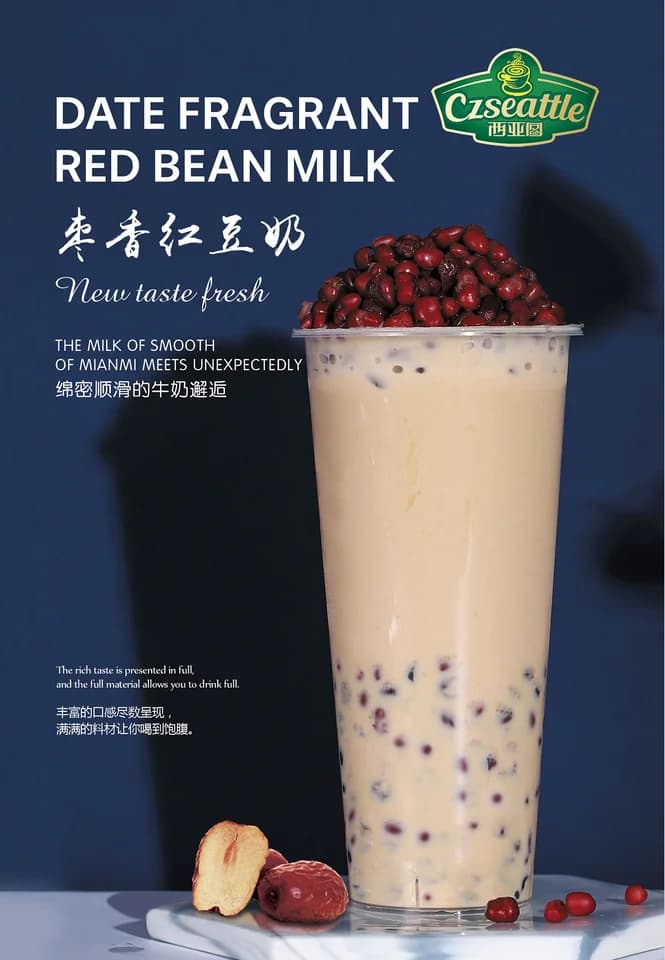
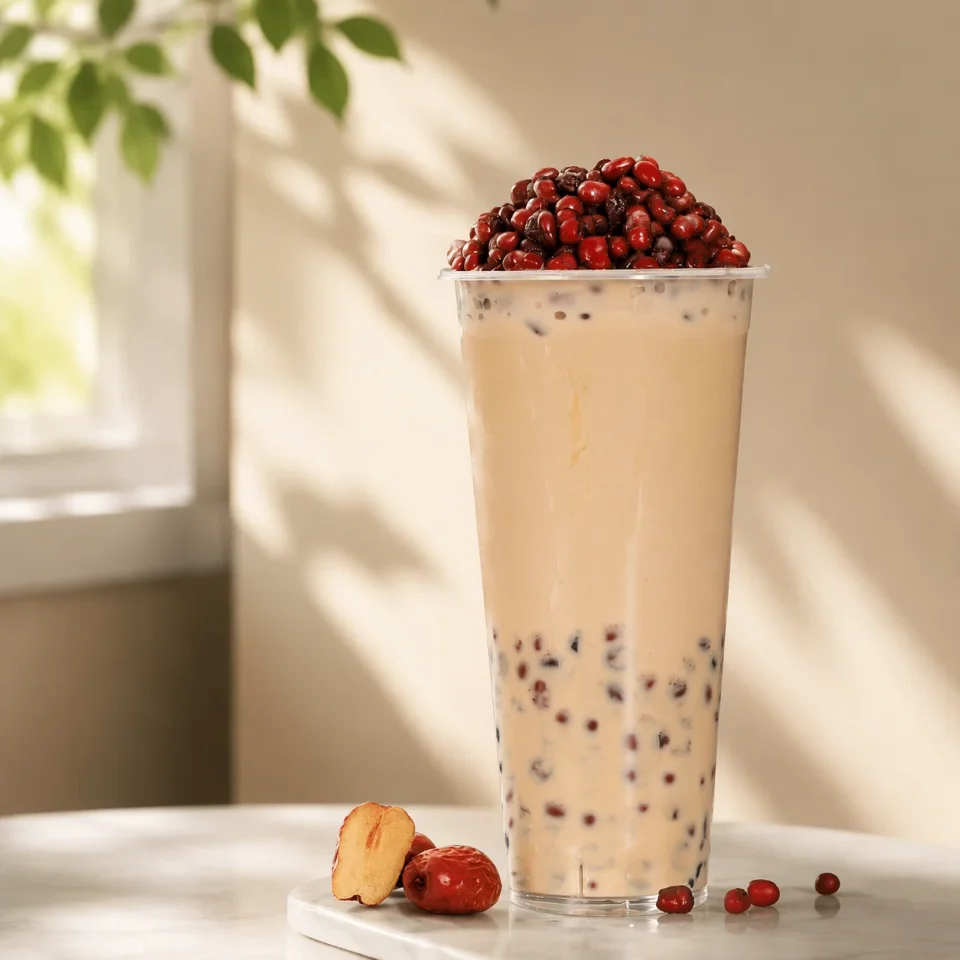
Both images are shown in full. This is one real enhancement example, not a promise of identical results or unchanged product details.
Review every enhanced image before publishing. Check ingredients, portions, branding and visual accuracy against the dish you actually serve.
When you need a different editing tool
- For precise lettering, use a tool that lets you control text directly. Generated words may not match the original.
- For advertising layouts, add your headline, price and other design elements in your layout tool after reviewing the food image.
- For an exact crop or output size, make those adjustments in an appropriate image or menu tool and check the destination’s requirements.
MenuGleam’s current enhancement flow does not include those manual editing controls. If the AI result changes the food inaccurately, do not publish it.
Food photo editing questions
Can I edit a precise part of the photo?
The current workflow does not include brushes, masks or manual selections. You choose a restaurant look for AI enhancement. It cannot guarantee that a change will affect only one selected area.
Will brand names and packaging text stay exactly correct?
Exact text and logo preservation is not guaranteed. Inspect lettering, logos and packaging against your original and actual product. Do not publish an image with inaccurate branding.
Does editing use credits?
Photo enhancement uses credits. Review the current plans and prices before purchasing. This workflow does not promise a free generation or unlimited edits.
Make your next menu photo look ready to sell.
Upload a real dish photo and see what MenuGleam can do.
Enhance Your Food PhotoEnhancements use credits. Review your result before publishing.